

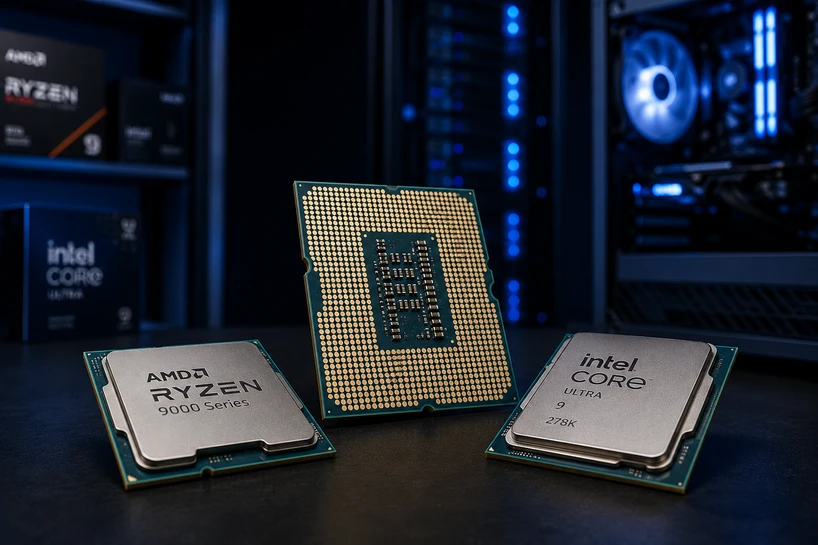
A graphics card draws frames, but the processor organises much of the computer’s work. It handles game logic, browser tabs, spreadsheets, code, video exports, and background apps.
Buying CPUs in 2026 takes more thought than comparing an i5 with an i7. Modern chips mix core types, graphics, large caches, AI engines, and different power limits.
The right choice must fit your software, motherboard, cooling, memory, GPU, and budget.
What is a Processor?
A processor, or Central Processing Unit, is the main general-purpose chip inside a computer. People call it the brain of the computer because it reads instructions, performs calculations, moves data, and directs other parts. Files, web pages, formulas, and game frames all create CPU work.
Modern CPUs & processors contain several cores, but they never work alone. RAM holds active data, storage keeps files, the GPU handles graphics, and the motherboard connects the parts.
Too little RAM or a weak GPU can still hold back an expensive CPU.
Understanding CPU key specifications
Cores and Threads
A core acts like an individual worker inside the processor. A thread is a stream of instructions a core handles.
Some cores run two threads, while hybrid chips combine larger and smaller cores. Raw counts aren’t directly comparable across every family.
Six to eight capable cores suit most gaming PCs in 2026. Video editing, 3D rendering, software builds, virtual machines, and heavy multitasking can use 12 or more. Extra cores only help when software keeps them busy.
Clock Speed (GHz)
Clock speed shows how many cycles a processor attempts each second. A 5GHz chip runs five billion cycles per second, yet another design may do more work per cycle. Compare GHz mainly within one processor family.
Base clock describes a defined operating point. Boost clock is the higher speed reached when power, temperature, workload, and firmware allow it.
Fast single-core boost helps games. Sustained all-core speed matters during long renders and exports.
TDP (Thermal Design Power)
TDP helps builders assess cooling needs, but it is not a universal indicator of actual power consumption. Intel uses terms such as Processor Base Power on newer products and states that base power is not the highest power a processor may dissipate. Boost behaviour can raise heat far above the base figure.
Check base power, boost power, cooler rating, airflow, and motherboard settings. A marginal cooler may become noisy or lower CPU speed during long workloads.
Cache (L1, L2, L3)
Cache is fast memory built into the processor. L1 sits closest to each core. L2 and L3 hold more data.
More cache can reduce waits for system memory. Some games gain greatly from a large L3 cache; other programs gain less. Compare cache with architecture, clock speed, and test results.
Integrated Graphics (iGPU)
An integrated GPU sits inside the processor package and displays the desktop without a separate graphics card. It suits office PCs, study systems, media, troubleshooting, and light creative work. Stronger versions can run modest games.
Not every CPU includes active graphics. Intel “F” models have commonly lacked it, while AMD support differs by family and model. Check specifications and motherboard display outputs.
Process Node (nm, Nanometre)
The process node labels the technology used to build a chip or tile. Smaller numbers can allow more transistors in a given area and lower power, but they don’t prove that one CPU is faster.
Three-nanometre and four-nanometre production appears in premium mobile chips and advanced tiles. Many desktop processors combine parts made on different nodes. Architecture, packaging, cache, voltage, and power limits still matter.
Types of CPU Processors Explained (Laptop, Desktop, Server & More)
Laptop Processors
Laptop processors work within tight heat and battery limits. Thin models use lower-power chips, while gaming notebooks allow more sustained power. Identical CPUs can perform differently because cooling, memory, firmware, and chassis design differ.
Most laptop CPUs are soldered to the board, making replacement impractical. Judge the whole laptop, not the chip name alone.
Desktop Processors
Desktop processors have more room for cooling and sustained power. Many fit a replaceable socket, giving builders control over the motherboard, cooler, RAM, GPU, and case.
They suit gaming, office, creator, and workstation PCs. Check whether the box includes a cooler; high-power models may need a separate one.
Server Processors
Server processors focus on uptime, large memory capacity, error-correcting memory, many memory channels, high core counts, extra PCIe lanes, and remote management. They run databases, virtual machines, storage, and business apps.
They aren’t automatically better for gaming. Server platforms cost more, and many trade high clock speed for more cores.
Processor Boards
A processor board is not a CPU class. It carries one or more processors, memory links, power circuits, and system interfaces. It may be a motherboard, server board, single-board computer, or embedded module.
Check its CPU support list, socket, firmware, memory slots, expansion lanes, ports, and size.
VRM Processors
“VRM processor” is not a standard CPU category. VRM means voltage regulator module, the motherboard circuitry that converts power into the low, steady voltage a processor needs.
A weak or hot VRM can hold back a high-power CPU. Match demanding PC processors with a board built for sustained load. A modest chip doesn’t need a flagship board.
Proprietary Processor
A proprietary processor belongs to a controlled platform or instruction set chosen by one company. Apple silicon, console chips, networking appliances, and many industrial systems fit this description.
Such chips may work well inside their intended products, but buyers can face fixed memory, soldered storage, limited repairs, or no processor upgrade route. Check software support and replacement plans first.
Budget Considerations When Choosing a CPU
Price the whole system before setting the CPU budget. A processor may require a new motherboard, DDR5 memory, a stronger cooler, or a larger power supply.
A cheaper chip that works with existing parts may offer better value than a discounted high-end model that triggers several other purchases.
Entry-level computer processors suit documents, web work, lessons, streaming, and basic home use. Mid-range processors fit gaming, coding, photo work, and mixed tasks.
High-end chips earn their cost in long renders, virtual machines, scientific work, and paid production, where saved time has clear financial value.
Spend on the workload you run each week, not a rare heavy task.
Choosing CPU Based on Use Case
For gaming, seek strong per-core performance, enough cores for the game and background apps, and cache that tests well in the titles you play.
Pair the CPU with the target graphics card and resolution. At 4K, the GPU carries more load. High-refresh gaming exposes CPU limits sooner.
Video editors and 3D artists should favour more cores, strong sustained cooling, and hardware media support for their codecs. Office users and students can save money with lower-power processors and integrated graphics.
Server buyers should favour validated memory, stability, remote management, expansion lanes, and enough cores for planned users or virtual machines.
A CPU choice belongs inside a wider hardware plan. Our Complete Guide to IT Hardware for Businesses in 2026 (Servers, Storage, Networking & More) explains how processors connect with servers, storage, networking, memory, backup needs, and growth.
Avoid These CPU Buying Mistakes
|
Mistake |
What Goes Wrong |
Impact |
|
Choosing a CPU only from marketing numbers |
The buyer follows the newest generation, the highest GHz figure, or brand tier, without checking real tests |
Poor workload fit and wasted money |
|
Overbuying performance |
A top-tier chip goes into a PC used for email, documents, and streaming |
Higher cost with little daily benefit |
|
Ignoring power and cooling |
The cooler, airflow, or motherboard power delivery cannot support the processor |
High temperatures, noise, and lower sustained speed |
|
Skipping the upgrade path |
The socket, chipset, BIOS, and memory plan receive no attention |
Earlier motherboard replacement and higher later cost |
|
Copying PC builds blindly |
A parts list made for someone else’s games, software, screen, and budget gets copied |
An unbalanced system that solves the wrong problem |
CPU Compatibility Checklist
Before buying, confirm:
- The CPU and motherboard use the same socket.
- The chipset supports the processor and required features.
- The installed BIOS version recognises the CPU.
- The board and CPU support the chosen DDR4 or DDR5 memory.
- The cooler fits the socket and handles the heat output.
- The power supply has enough capacity and the right connectors.
- The GPU suits the CPU, resolution, and frame-rate target.
A matching socket does not guarantee a working build. AMD says AM5 boards support Ryzen 7000, 8000, and 9000 processors, but older 600-series boards may need a BIOS update. AM5 uses DDR5, so DDR4 cannot move into that platform.
Future-Proofing Your CPU
Buying for a longer service life means leaving room above today’s needs. Six to eight strong cores give many home and gaming systems breathing space in 2026.
Parallel creator and business workloads may need more. Extra cores cannot rescue weak single-core speed or limited memory.
AI-ready processors now add a neural processing unit, or NPU, for supported local AI tasks. Microsoft set a 40-plus TOPS NPU mark for Copilot+ PCs, and current laptop families give this hardware far more attention. Buy an NPU for software you expect to use, not for the badge alone.
The motherboard path matters too. In May 2026, AMD extended AM5 support through 2029, though each later chip still depends on board-maker firmware and power support.
Conclusion
Daily work should set the processor target. Gaming needs a balanced CPU and GPU. Editing rewards cores, cooling, and media support. Office work gains more from a quiet, responsive PC than an idle flagship chip.
Check the complete system before paying: CPU, graphics card, RAM, motherboard, cooler, storage, and power supply. Leave room for upgrades you can realistically make. The right CPU depends on your use case, not price, hype, or the largest number on the box.
Frequently Asked Questions
A: Processor numbers show the brand family, performance tier, series, and model position. Suffix letters may show overclocking support, lower power, laptop class, or missing graphics. Naming rules differ across Intel, AMD, laptop, desktop, and server ranges, so check the maker’s page for the exact model.
A: In Windows, open Settings, choose System, then About, and read the processor line. Task Manager, System Information, the BIOS, or the retail box can also show it. Copy the full name, including suffix letters, because similar models can use different graphics, power limits, and sockets.
A: List your apps, games, screen resolution, multitasking, and upgrade plans. Compare tests for those tasks, total platform cost, power, cooling, motherboard support, and GPU pairing. Buy the least costly chip that meets those needs with reasonable headroom.
A: No. GHz counts clock cycles, not the work completed in each cycle. A newer processor with a lower clock can beat an older high-clock chip through better architecture, cache, memory access, and core design. Compare GHz within the same family and check task-based tests.
A: You need the memory type supported by the CPU and motherboard. AM5 desktop systems use DDR5, while older platforms and a few other boards may use DDR4. DDR4 and DDR5 differ physically and electrically, so they cannot share a slot.
A: Some boxed processors include a stock cooler, while many high-power, tray, and workstation chips do not. Intel says boxed processors generally ship with a thermal solution, but packaging varies by model and region. Check the listing for “cooler included” before ordering.
A: No. The socket, chipset, BIOS, memory type, motherboard power delivery, and cooler mounting must support the processor. Check the motherboard maker’s CPU support list and required BIOS version before purchase, even when the socket name matches.


