

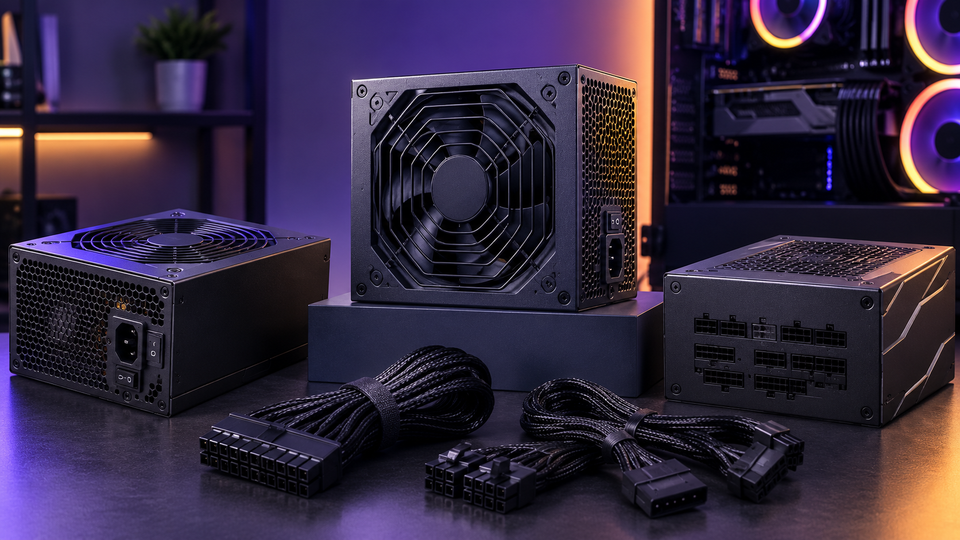
A graphics card gets the attention. The Power Supply does the quiet work. If the PSU sends unstable voltage, lacks the right connector, or runs too close to its limit, an expensive PC can crash under load.
New processors and graphics cards can raise power use in short bursts. Compact cases also leave less room for cables and airflow. A good 2026 purchase needs more than the wattage printed on the box.
This guide covers Power Supplies for desktops, workstations, and larger IT orders. It also separates the PC Power Supply Unit PSU from rack-level Power Devices, such as a Power Distribution Unit PDU and UPS.
Decoding the Power Supply Unit PSU
A Power Supply Unit PSU takes alternating current from the wall and converts it into the direct-current voltages a computer can use. The motherboard, processor, graphics card, storage, fans, and add-in cards all depend on that conversion.
Modern Computer power supplies feed heavy loads through the 12V rail and provide 5V and 3.3V for lower-voltage parts. Switching circuits, capacitors, filters, control chips, and cooling parts manage the process. Their quality affects heat, noise, and working life.
A well-made PSU holds its output steady from idle to full load and controls small unwanted changes called ripple. Protection circuits shut it down during excess voltage, excess current, a short circuit, excess power, or unsafe heat.
ATX 3.1 support deserves close attention in 2026. It covers sudden load changes, while many compliant units include a native 12V-2x6 cable for 16-pin graphics cards. The current desktop power guide aligns with ATX 3.1 and covers ATX, SFX, TFX, and FlexATX formats.
Efficiency ratings show how much wall power becomes usable PC power. The rest becomes heat. An 80 PLUS Gold unit suits many new businesses and performance builds, but the badge does not prove electrical quality. Check load tests, protection behavior, noise, warranty, and the exact model.
Buy the Right Power Supply Capacity
Buy the right Power Supply capacity by sizing for peak demand, not the average draw during light work. The PSU needs room for demanding workloads, short graphics card spikes, fan startup, attached storage, and later upgrades.
How do I calculate how much wattage I need?
Use this working formula:
GPU maximum board power + CPU maximum package power + 100 to 150W for the motherboard, memory, storage, fans, pumps, and add-in cards + 20 to 30% headroom
A 250W graphics card, 140W processor, and 125W for other parts total 515W. Add 25% headroom, and you reach about 644W, so a quality 650W unit can fit. Choose 750W for a stronger graphics card, sustained rendering, or quieter fan behavior.
Do not calculate from CPU TDP alone because boost power can exceed the base rating. Use the CPU’s maximum package power and the GPU’s maximum board power. Compare your total with the graphics card maker’s suggested PSU rating and use the higher number.
Useful starting ranges include:
- 450W to 550W for office PCs, integrated graphics systems, and lower-power builds.
- 650W for many mainstream gaming PCs and business workstations.
- 750W for upper-midrange graphics cards and later upgrades.
- 850W for many high-end single-GPU systems.
- 1000W or more for flagship graphics cards, power-heavy processors, or special workstation loads.
Current 2026 buying guides place many mainstream systems at 650W to 750W and high-end builds at 850W to 1000W, with extra room for load spikes.
More wattage does not make a PC faster. A 1000W Power Supply only provides the power that the system requests.
Buying far beyond the real need raises cost and may place normal use far below the unit’s best operating range. Buy enough room, not the largest number on the shelf.
What Form Factor is Right for Your PSU
The PSU form factor must match the case mounts, body space, cable room, and airflow path. Check the case manual before ordering.
ATX fits full-size towers, mid-towers, and many micro-ATX cases. It offers broad wattage and cable choices. Depth still varies, so measure behind storage cages and front radiators.
SFX fits compact Mini-ITX systems and saves room for the graphics card and cooling. It can cost more at the same wattage. SFX-L adds depth for a larger fan, so confirm case support.
FlexATX uses a long, narrow body for slim desktops, appliances, and custom enclosures. Its small fan can make more noise, and the connector choice stays limited.
For internal node deployment, confirm format, depth, screw pattern, fan clearance, cable direction, and connector reach. Matching the form factor name alone does not guarantee a clean fit.
PC Power Supplies vs. Enterprise Infrastructure
PC power supplies feed one computer node. Enterprise power equipment manages electricity across servers, network devices, storage arrays, racks, rooms, or facilities. Buyers should not treat those jobs as the same product class.
A desktop PSU converts wall power into one PC. A server power module may add hot-swap support, matching redundant bays, firmware reporting, and a vendor-specific shape. A rack PDU takes one higher-capacity feed and sends it to many devices.
A UPS adds stored energy and power conditioning so equipment can stay online during a short outage or shut down in a controlled way.
A 750W ATX PSU cannot replace a 750W hot-swap server module simply because the wattage matches. The server may need an exact part number, connector edge, airflow direction, firmware match, and redundancy rating.
Commercial hardware classification should begin with the device model and required part number, then move to wattage and electrical details.
Types of Power Devices
Power Devices change, store, feed, or protect electricity across personal electronics, desktops, racks, and data centers.
Battery Chargers
Battery Chargers control voltage and current for rechargeable batteries. Match the battery chemistry, voltage, connector, output current, and maker-approved part number. A wrong charger can stop charging, shorten battery life, or trigger protection circuits.
Power Inverters
Power Inverters change direct current into alternating current. They can take power from a battery bank, vehicle system, or solar setup and produce AC output for equipment that expects wall-style power.
For emergency-grid use, check continuous and surge wattage, waveform, battery voltage, socket type, and transfer method. Sensitive computer equipment may need pure sine wave output. An inverter may lack the fast transfer and shutdown support of a computer UPS.
Mobile Device Chargers
Mobile Device Chargers supply low-voltage power to phones, tablets, handheld scanners, headsets, and other endpoint gear. USB Power Delivery lets compatible devices and chargers agree on a suitable power level through the cable. The current USB-IF library lists USB Power Delivery Revision 3.2 specifications for 2026.
Match the wattage, USB standard, port, cable rating, and device needs. Under the standard, the charger and device agree on the power the device can accept.
Power Adapters & Inverters
Power Adapters & Inverters support auxiliary hardware. An adapter may change AC into a fixed DC voltage for a router, monitor, mini PC, dock, or external storage unit. An inverter changes DC into AC.
Read the label before replacement. Match output voltage exactly, meet or exceed the required current, confirm polarity, and check the plug size. A connector that fits can still carry the wrong voltage.
Power Distribution Unit PDU
A Power Distribution Unit PDU feeds multiple devices inside a rack. Basic units distribute power. Metered models show load data. Switched and intelligent models can add outlet control, remote access, alerts, and per-outlet readings.
Choose a PDU by input plug, voltage, phase, current limit, outlet count, outlet type, rack position, and monitoring needs. Rack PDUs distribute power to servers, switches, and storage equipment inside a rack. Server Blink lists basic, metered, switched, horizontal, and vertical options across enterprise brands.
UPS
A UPS supplies battery-backed power during an outage or unsafe voltage event. It can keep a workstation online briefly or support a controlled server shutdown.
Match the UPS by watts, volt-amperes, runtime, outlet type, input voltage, battery service plan, and topology. Standby units suit basic desktop loads. Line-interactive units correct some voltage changes without using the battery.
Online double-conversion units continuously rebuild the output and suit sensitive or high-availability loads. A UPS uses stored battery power to take over when the main utility feed fails.
Building reliable business IT requires the right servers, storage systems, networking equipment, and supporting components. Read our Complete Guide to IT Hardware for Businesses in 2026 (Servers, Storage, Networking & More) to compare essential hardware and make informed buying decisions.
Multi-Tier Procurement Architecture
Our Power Supply Recommendations start with the workload, then the exact platform, then the purchase volume. Do not start with price or wattage alone.
For one desktop, choose the right wattage, ATX 3.1 support, form factor, native cable set, tested protection circuits, and warranty. For a fleet, add model standards, replacement stock, cable control, serial tracking, and approved substitutes.
Heat also shapes service life. Choose a fan profile that suits the load, keep the intake clean, and avoid running near full output for long periods. Extra capacity can lower fan speed and heat.
For mixed or legacy fleets, record the maker, model, service tag, old part number, output, connectors, form factor, and redundancy needs. This cuts mismatch risk.
Enterprise Supply Chain: Deployment Matrix at Scale
Bulk hardware deployment works best when procurement groups systemize by use instead of ordering one PSU type for every machine. Create bands for office desktops, graphics workstations, small servers, rack servers, network hardware, and backup equipment.
A deployment matrix should list the primary part, substitute, wattage, form factor, input range, connectors, warranty, target system, quantity, and spare ratio. Add redundancy pairing for servers and battery dates for UPS orders.
Centralized ordering gives the IT team one record of what is entered into the fleet. It also lets the buyer combine new desktop units, legacy replacements, hot-swap server modules, PDUs, adapters, and UPS hardware in one planned order.
Server Blink’s catalog lists PC, desktop, laptop, server, and rack power products, along with bulk-order and part-matching support.
Conclusion
A sound power plan starts at the computer and follows the path through the rack and backup system.
Choose each PC Power Supply by demand, upgrade plans, form factor, connectors, heat, and testing. Choose enterprise units by platform match, redundancy, rack feed, and monitoring.
Server Blink helps business buyers bring those needs into one purchase plan. A unified order can cover current PC power supplies, Computer power supplies for older systems, vendor-specific server modules, Power Distribution Unit PDU hardware, adapters, inverters, and UPS equipment.
Clear part records and fleet standards reduce mismatch risk and make later replacement work far easier.
Frequently Asked Questions
A: A 750W PSU is not overkill for many upper-midrange gaming PCs and workstations. It gives room for a strong graphics card, CPU boost power, storage, fans, and a later upgrade. It becomes unnecessary for a basic office PC or a system that draws less than 300W under full load.
A: Calculate peak demand, add 20 to 30% headroom, then match the form factor and every required connector. Check the exact model’s electrical tests, protection features, fan noise, warranty, and ATX 3.1 support rather than choosing by brand alone.
A: A basic office PC may need 300W to 450W, while many mainstream gaming and work systems fit between 650W and 750W. High-end single-GPU builds can need 850W to 1000W or more, based on the processor, graphics card, add-in hardware, and upgrade plan.
A: Check wattage capacity, form factor, connector support, electrical quality, and cooling. Electrical quality includes steady voltage, low ripple, working protection circuits, verified testing, and a suitable warranty.
A: A 1000W PSU makes sense for a flagship graphics card, a high-power processor, heavy workstation cards, several add-in devices, or a planned near-term upgrade. It does not give extra performance to a system that only needs 500W, so lower-demand PCs gain little from the added cost.
A: Yes. Server Blink lists desktop, laptop, legacy system, server, hot-swap, rack power supply, PDU, and UPS categories, and its procurement support covers bulk orders. Availability depends on the exact part number, system match, quantity, and stock at the time of the request.


