

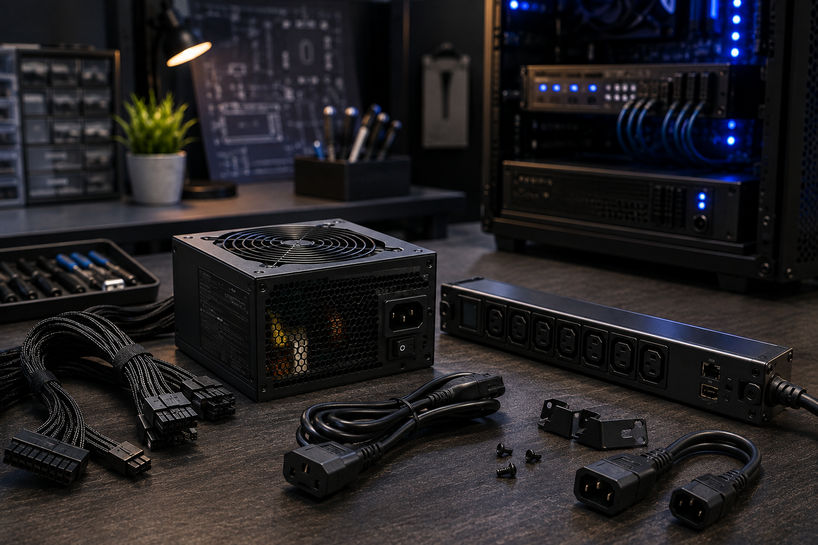
Every computer runs on one thing before anything else: clean, steady electricity. Power devices are the tools that deliver it.
A PSU feeds your desktop, a UPS keeps it alive during an outage, and a surge suppressor stands between your hardware and a lightning strike.
In 2026, this matters more than it used to. Graphics cards now pull over 400 watts on their own, hybrid work has pushed serious hardware into homes with ordinary wiring, and one bad voltage spike can wipe out a machine worth thousands.
What Are Computer Power Devices?
Power devices are any hardware that supplies, converts, distributes, or protects the electricity your computer uses. That covers the power supply inside your desktop, the charger for your laptop, and the strip everything plugs into.
Computers need them because wall outlets deliver alternating current (AC), while every chip inside your machine runs on low-voltage direct current (DC).
Something has to convert one into the other, hold the voltage steady, and cut the power fast when something goes wrong. That's the job of power devices, and it's why they sit at the center of power management for any setup, from a single laptop to a full server rack.
Why Choosing the Right Power Device Matters
The right power device gives you four things you can't get any other way.
Stability: A quality PSU holds voltage steady even when your CPU and GPU spike their demand at once. A weak one lets voltage sag, and that's where random crashes and blue screens come from.
Safety: Good units include over-voltage, over-current, and short-circuit protection. These cut power in milliseconds when a fault appears, before heat or fire ever becomes a risk.
Performance: Modern processors boost their clock speeds only when power delivery allows it. Starve them, and you leave speed on the table.
Data protection: A sudden power cut mid-write can corrupt files or an entire drive. A UPS gives you the minutes needed to save and shut down properly.
Kinds of Computer Power Devices You Can Buy
Here's what each category does and who actually needs it.
Power Supply (PSU)
The PSU converts wall AC into the DC voltages your desktop components use: 12V, 5V, and 3.3V. Wattage ranges from around 450W for basic builds to 1200W+ for high-end gaming rigs.
Look for an 80 Plus rating (Bronze through Titanium), which tells you how much input power actually reaches your hardware instead of turning into heat.
UPS (Uninterruptible Power Supply)
A UPS is a battery backup. When the grid fails, it switches to battery in milliseconds and keeps your computer running for a few minutes to an hour, depending on capacity.
It also smooths out brownouts and small fluctuations before they reach your machine.
Power Distribution Unit (PDU)
A PDU spreads power from one source across many outlets, mainly in server racks and network cabinets. Basic models are heavy-duty power strips.
Smart PDUs add per-outlet monitoring and remote switching, which lets IT teams reboot a frozen server without visiting the room.
Surge Suppressors
These absorb sudden voltage spikes from lightning, grid switching, or large appliances cycling on.
Check the joule rating: 1000 joules is a sensible floor for computer gear, and 2000+ is better for expensive setups. They wear out silently over time, so replace them every few years.
Power Inverters
A power inverter converts DC (from a car battery or solar system) into AC your devices can use.
Pure sine wave models cost more but produce grid-quality output that sensitive electronics need. Modified sine wave units are cheaper and fine for basic loads, but risky for computers.
Power Banks
Portable batteries for laptops, tablets, and phones. For laptop charging, you want USB-C Power Delivery at 65W or higher and a capacity of at least 20,000mAh.
Airlines cap carry-on batteries at 100Wh, so check before buying a monster.
Battery Chargers
These recharge removable cells like AA, AAA, and 18650 batteries. Smart chargers detect when a cell is full and stop, which extends battery life and prevents overheating.
Handy for wireless keyboards, mice, and anything else that eats batteries.
Power Injectors
A PoE (Power over Ethernet) injector pushes electricity through a network cable, letting you run an IP camera, access point, or VoIP phone in a spot with no outlet nearby.
Match the standard (802.3af, at, or bt) to what your device requires.
Transformers
Transformers step voltage up or down. You'll need one when running a 110V device in a 220V country or the reverse. Buy one rated at least 25% above your device's wattage so it never runs at its limit.
Quick Comparison of PSU, UPS, PDU & More
|
Device |
What It Does |
Where It Is Used |
Key Benefit |
|
Power Supply (PSU) |
Converts AC to stable DC for internal components |
Inside desktop PCs and servers |
Steady voltage for every part |
|
UPS |
Provides battery backup during outages |
Homes, offices, server rooms |
Time to save work and shut down safely |
|
PDU |
Distributes power across many outlets |
Server racks, network cabinets |
Organized power for many devices |
|
Surge Suppressor |
Absorbs voltage spikes |
Any outlet feeding electronics |
Shields hardware from spikes |
|
Power Inverter |
Converts DC to AC |
Vehicles, solar setups, off-grid work |
Runs AC gear away from the grid |
|
Power Bank |
Stores portable charge |
Travel, commuting, fieldwork |
Charging anywhere, no outlet needed |
Key Things to Check Before Buying
Run through this list before you pay for anything.
Power capacity: Add up the wattage of everything the device will feed, then add 20 to 30% headroom for boost loads and future upgrades.
Safety features: Over-voltage, over-current, short-circuit, and thermal protection should all be listed on the spec sheet. If a seller can't show them, walk away.
Compatibility: Match connectors, form factor (ATX vs SFX for PSUs), voltage standards, and PoE classes to your exact hardware.
Build quality: Japanese capacitors in a PSU, metal housings on PDUs, and real UL or CE certification marks separate serious products from cheap clones.
Brand reliability: Established makers back their units with 7 to 10-year warranties on PSUs. That warranty length tells you how much the maker trusts its own product.
Budget: Spend where failure hurts most. A cheap mouse is fine. A cheap PSU can take your whole build down with it.
How to Choose the Right Power Devices for Your Computer
Start with what your machine actually demands. A gaming PC with a current-generation GPU wants an 850W or larger 80 Plus Gold PSU, a pure sine wave UPS, and a high-joule surge suppressor.
An office desktop doing email and spreadsheets runs happily on a 450 to 550W Bronze unit and a modest UPS.
Laptop users have different priorities: a genuine charger with the correct wattage, a USB-C power bank for travel, and a small surge suppressor at the desk. Skip the counterfeit chargers on marketplace sites; the savings aren't worth a cooked battery.
On price versus performance, the sweet spot rarely sits at either extreme. Mid-range units from proven brands deliver 90% of flagship quality at 60% of the cost.
If you're building or upgrading a desktop and want help picking the exact unit, our PC Power Supply Buyer's Guide 2026: Top Tips and Recommendations goes deeper into wattage calculations, 80 Plus tiers, modular cabling, and specific models worth your money this year. It pairs well with this guide once you've settled on what your setup needs.
Common Mistakes to Avoid When Buying Power Devices
The same errors show up again and again, and each one is avoidable.
Buying the cheapest unit available tops the list. No-name PSUs skip protection circuits and use capacitors that swell within a year.
Second is ignoring real power requirements; people count only the CPU and GPU and forget drives, fans, and RGB lighting, then wonder why the system reboots under load.
Third, skipping safety features to save a few dollars, which turns a routine grid fault into dead hardware.
And fourth, not checking compatibility, which is how you end up with a PSU that won't fit your case or a PoE injector on the wrong standard.
Power Devices for Gaming vs Office Use
Gaming setups live under stress. Frame-to-frame power draw on a modern GPU can swing by hundreds of watts in milliseconds, so gamers need higher wattage, Gold-rated or better efficiency, strong transient response, and a UPS with pure sine wave output.
Office machines sip power by comparison. A mid-wattage Bronze PSU, a basic UPS for data protection, and a decent surge suppressor cover the whole risk picture. The office priority is uptime and saved files, not peak delivery.
Simple rule: gamers pay for headroom and response speed, office users pay for backup time and protection. Neither should pay for what they won't use.
Future Trends in Power Devices
A few shifts worth watching as you shop in 2026. The ATX 3.1 standard and the 12V-2x6 connector now handle GPU power spikes far better than older designs, so favor them in new PSU purchases.
Gallium nitride (GaN) chargers keep shrinking; a 100W laptop charger now fits in a shirt pocket. Smart PDUs and UPS units increasingly ship with app-based monitoring that flags failing batteries before they die.
And efficiency keeps climbing across the board, with Titanium-rated units losing under 10% of input power even at partial load.
Best Practices for Maintaining Power Devices
Power devices last longer when you treat them well. Blow dust out of PSU intakes every few months, since dust traps heat and heat kills capacitors.
Never load any device past 80% of its rating for sustained periods. Keep a surge suppressor in front of everything, and replace it after any major spike event.
Test your UPS battery twice a year by pulling the wall plug under a safe load, and expect to swap the battery every 3 to 5 years.
Conclusion
Power devices decide whether your hardware runs for a decade or dies in a storm. The buying logic stays constant across every category: know your real wattage, insist on protection features, verify compatibility, and buy from makers who stand behind long warranties.
Get those four things right, and the rest of your setup takes care of itself. When in doubt, size up, not down.
Frequently Asked Questions
A: A PSU sits inside your computer and converts wall power into the DC voltages your components use. A UPS sits outside it and keeps power flowing from a battery when the grid fails. One converts, the other backs up, and a desktop setup benefits from both.
A: Yes. A quality suppressor costs $25 to $60 and can absorb spikes that would destroy a $2,000 machine. Just remember they degrade with every hit, so replace them every 2 to 3 years or after a known surge event.
A: Only in a limited way. An inverter paired with a battery can run a computer off-grid, but it won't switch over automatically during an outage the way a UPS does. If you go this route, choose a pure sine wave model; modified sine wave output can stress PC power supplies.
A: Buying no-name budget units, underestimating total wattage, skipping protection features, and ignoring compatibility details like form factor and connector types. Most failed purchases trace back to one of these four.
A: An 850W or higher 80 Plus Gold PSU (ATX 3.1 with a 12V-2x6 connector for current GPUs), a pure sine wave UPS rated above your system's peak draw, and a surge suppressor with 2000+ joules of protection.
A: A quality PSU lasts 7 to 10 years. UPS batteries need replacement every 3 to 5 years even if the unit itself keeps working. Surge suppressors should go every 2 to 3 years, and immediately after absorbing a large spike.
A: Add the rated wattage of your CPU, GPU, drives, fans, and accessories, then add 25 to 30% headroom. A typical office build lands near 450 to 550W, mainstream gaming builds near 750W, and high-end rigs at 1000W or more.
A: Keep them dust-free, run them below 80% of rated load, put surge protection in front of everything, and test UPS batteries twice a year. Cool, clean, and lightly loaded devices outlast abused ones by years.


