Picking a barcode printer isn’t about chasing the biggest spec sheet. It’s about fit. Reviewed manufacturer specs, industry reports and buyer feedback from real labeling environments and the same pattern keeps showing up: the right barcode printer makes daily work faster, while the wrong one quietly drains time and money.
This guide walks you through what to look for in a barcode printer. You’ll compare printer types, printing technologies, label materials, performance, connectivity, business applications, total cost and durability. By the end, you should know how to choose a barcode printing machine that matches your actual workflow.
If you’re still comparing printer categories beyond barcode systems, read our pillar guide: The Ultimate Printer Buying Guide: Tips and Recommendations It gives you the bigger picture on printer selection, maintenance and long-term value.
Determine What You Need From a Barcode Printer
Before you look at models, answer six questions. How many labels do you print daily? Under 500 is light. Between 500 and 3,000 is moderate. Over 3,000 is high volume. What label sizes and materials do you use? Do you print continuously or in bursts? Will the printer sit indoors or face dust, heat, cold or moisture? Is your workflow fixed or mobile? Do labels need to last weeks or years?
These answers narrow your options fast. They also stop you from overbuying features you’ll never use. In my experience reviewing labeling setups the biggest mistake buyers make is skipping this step and jumping straight to product pages.
Find the Barcode Printer Type That Fits Your Workflow
Desktop Barcode Printers
Desktop barcode printers are compact, affordable and perfect for light to moderate work. They suit retail price tags, shipping labels, office barcodes and clinic labeling. They’re easy to set up and fit on a counter. Just don’t expect them to run nonstop at industrial volume. Manufacturer specs typically rate desktop models for 500 to 2,000 labels per day and pushing beyond that shortens printhead life.
Industrial Barcode Printers
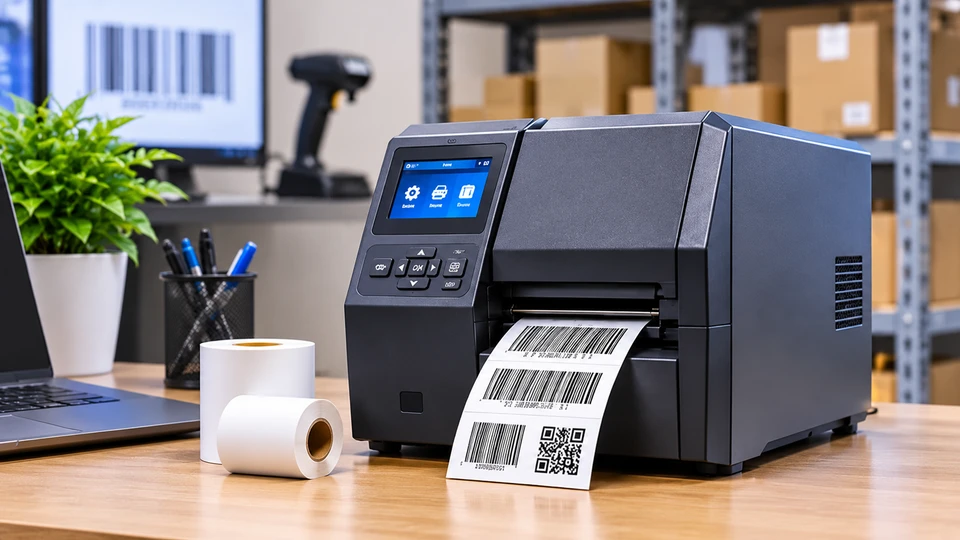
Industrial barcode printers are built for high volume, continuous printing. Their metal frames and stronger components handle warehouses, manufacturing lines and logistics hubs. They cost more upfront but they reduce downtime and protect print quality when the pressure is on. Industry data shows industrial printers captured over half of global barcode printer revenue in 2025, which tells you how much reliability matters in these environments.
Mobile Barcode Printers
Mobile barcode printers run on battery and connect wirelessly. Field service teams, delivery drivers and mobile workstations use them to print labels on the spot. They’re slower and hold less media, but they win when portability matters more than speed. A wireless barcode printer can also improve accuracy in inventory counts because labels get applied immediately not hours later.
Decide Which Printing Technology You Need
Direct Thermal vs Thermal Transfer
Direct thermal printers use heat-sensitive labels and no ribbon. They’re simple and cheap to run, but labels fade within 6-12 months. They work well for shipping labels, receipts and temporary tags.
Thermal transfer printers use a ribbon to bond ink onto the label. The result lasts for years and resists heat, moisture and chemicals. They’re better for asset tags, healthcare labels and manufacturing. Direct thermal printheads also wear 2-4 times faster because they touch the media directly. If durability matters, thermal transfer is usually worth it.
When buyers ask me about thermal transfer vs direct thermal printing, I tell them to think about the label’s entire life, not just the moment it prints. A shipping label that gets scanned once can be direct thermal. An asset tag that must survive five years of handling needs thermal transfer.
Choose the Right Labels for Your Barcode Printer
Labels are not just consumables. They directly influence which barcode printer you should buy. Get this wrong and you will either limit your printer’s capability or pay for features your labels can’t use.
Consider Barcode Label Materials
Paper labels work with both direct thermal and thermal transfer printers, which makes them flexible. But synthetic materials like polyester or polypropylene usually require thermal transfer printing because direct thermal coatings don’t bond well to non-paper surfaces. If your labels must survive harsh conditions, that requirement alone pushes you toward a thermal transfer printer, not a direct thermal one. Specialty labels like freezer grade or high temperature options may also demand a specific printer type or ribbon formulation.
Check Barcode Label Requirements
Label size directly affects printer choice. Wide pallet labels need a printer with a wider print width. Tiny electronics labels need higher resolution. A desktop printer with a 4-inch maximum print width cannot produce a 6-inch shipping label. Adhesive type, durability needs and roll specifications like core size and outer diameter can eliminate printers that don’t support them. Define your label requirements before comparing models. That saves time and prevents costly returns.
Compare Barcode Printer Performance
Resolution is measured in dpi. 203 dpi handles standard carton labels. 300 dpi is the balanced choice for product labels and QR codes. 600 dpi is for tiny electronics, medical UDI labels and jewelry tags. Higher resolution slows printing and costs more. A barcode printer with high resolution is only necessary when your label content demands it.
Print speed matters for high volume work. Desktop printers run 4-8 inches per second. Industrial models reach 12-14. Mobile printers are slower. Also check print width, duty cycle, barcode readability and output consistency. A printer that produces one perfect label but fails on the next will cost you more than it saves. Ask for a demo or sample print before you buy.
Check Barcode Printer Connectivity and Compatibility
USB is the baseline. Ethernet supports shared network printing. Wi-Fi and Bluetooth enable wireless barcode printing from tablets, phones and laptops. A wireless barcode printer works well for mobile workflows.
Software compatibility is just as important. Confirm the printer works with your label design software, inventory management system and POS system. Most models support ZPL, EPL or CPCL, but check before you buy. If you manage multiple printers, look for cloud device management. IT teams increasingly want remote firmware updates, printhead monitoring and troubleshooting without sending a technician on-site.
Choose a Barcode Printer for Your Business Application
Retail and product labeling usually need a desktop model. Warehousing and inventory need durable printers that handle large rolls and long runs. Shipping and logistics need speed for carrier labels. Manufacturing needs industrial thermal transfer printers that survive dust and heat. Healthcare needs precise, durable labels for UDI compliance. Asset management needs thermal transfer labels that last for years. Match the printer to the job, not the other way around.
If you run a barcode printer for retail businesses, prioritize fast label changes and compact size. If you run a barcode printer for network connectivity across multiple locations, prioritize Ethernet, Wi-Fi and cloud management.
Calculate Your Barcode Printer’s Total Cost
The purchase price is only the start. Add labels, ribbons, printhead replacement, maintenance and service. Direct thermal printheads wear faster, which raises long term cost. Thermal transfer printers need ribbons but often last longer.
Calculate cost per label: printer cost divided by expected label lifespan, plus media, ribbon, printhead and labor. At high volume, a small difference per label becomes a big number. Ask suppliers for sample pricing and printhead life estimates. When I compared barcode printer operating cost per label across common configurations, thermal transfer consumables came out around $0.013 per label, while pre-printed color labels cost roughly $0.41. That gap matters at scale.
Evaluate Barcode Printer Durability
Durability matters when you print continuously, run high volumes or work around dust and temperature swings. Look for heavy duty construction, metal gears, sealed components and a duty cycle rating that matches your workload. Frequent use exposes weak parts. Long term reliability comes from good design and proper maintenance.
If your printer runs in a dusty warehouse or a cold storage area, check the operating temperature range and IP rating. These specs separate printers that survive from printers that fail in months.
Find the Right Barcode Printer for Your Requirements
Once you have worked through volume, label type, printing technology and connectivity, the final step is matching those answers to the right printer type. If your daily output is light to moderate and your workspace is compact, a desktop barcode printer will usually be the most practical and affordable choice. For high-volume operations that run continuously, an industrial barcode printer is the better fit because it is built to handle heavy workloads, larger media rolls and tougher environments without constant downtime. If your team prints labels on the move, a mobile barcode printer or wireless barcode printer gives you the portability you need, even if it sacrifices some speed and media capacity. When label lifespan is short, direct thermal printers keep things simple and ribbon-free. When labels must survive heat, moisture, chemicals or years of handling, thermal transfer printers are worth the extra ribbon cost. And if you work in a specialized environment such as cold storage, manufacturing or healthcare, match the printer, printing technology and label material together rather than choosing any single component in isolation. In practice, the buyers who get the best results are the ones who match all three: printer type, printing technology and label media. The goal is not to buy the biggest or cheapest machine, but the one that fits your actual workflow, budget and long-term labeling needs.
Use a Barcode Printer Buying Checklist
- Define printing volume.
- Choose the printing technology.
- Select the printer type.
- Identify label requirements.
- Compare speed and resolution.
- Check connectivity.
- Confirm software compatibility.
- Calculate operating costs.
- Review durability and maintenance.
- Consider future requirements.
Conclusion
Choosing a barcode printer gets easier when you start with your workflow. Define volume, labels, technology, connectivity and budget. Then compare desktop, industrial and mobile barcode printers against those needs. A good barcode label printer delivers clear, scannable labels, fits your software, survives your environment and keeps operating costs predictable.
Frequently Asked Questions
A: Start with volume, label type, technology, connectivity and budget. Then compare printer types against those needs.
A: Desktop models handle light to moderate work. Industrial models are built for high volume, continuous printing in tough environments.
A: Choose the right technology, buy media in suitable quantities, maintain the printhead and calculate cost per label before buying.
A: Paper, synthetic, thermal and specialty labels. The best choice depends on durability, adhesive, environment and printer compatibility.
A: Yes. but check print width, media sensors and roll specifications. Not every printer supports every label size.
A: Yes. but match it to your workload and print quality needs. High resolution matters more for small or dense barcodes.