

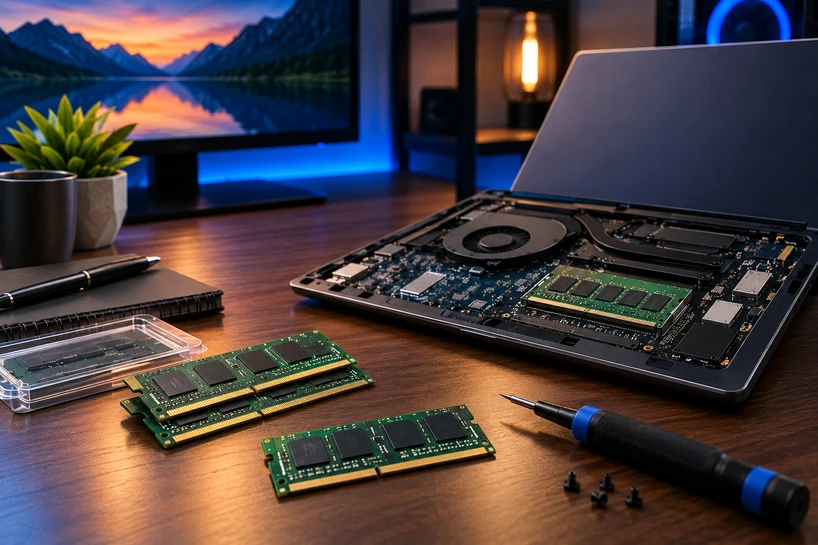
Two things happened at once, and together they changed how you should shop for a laptop.
The first is appetite. Windows itself eats more memory than it did three years ago. Chrome and Edge hold dozens of tabs in the background. AI assistants now run partly on your own machine instead of purely in the cloud, and they want their share too. The 8 GB that felt fine in 2020 now feels tight by lunchtime.
The second is the module itself. For twenty years, laptop memory meant one thing: a small stick you could pop out and replace. That's no longer true.
Some laptops still use removable sticks, plenty solder the chips straight onto the board, and a growing group uses a newer bolted-down format called CAMM. Three formats, three very different repair stories.
Here's the part that stings. On most thin laptops sold today, the RAM you pick at checkout is the RAM you keep for the life of the machine. There's no second chance later.
What Laptop Memory (RAM) Actually Does, and Why It Isn't Storage
Think of RAM as your desk and your SSD as the filing cabinet behind you. Everything you're working on right now sits on the desk where you can grab it instantly. Everything else stays filed away until you need it.
RAM (Random Access Memory) holds the apps, files, and browser tabs your processor is using at this exact second. It's fast because the processor can reach any part of it right away, no waiting. Storage is where things live when you're not touching them.
Memory is also volatile. Cut the power, and it empties completely. That's why an unsaved document disappears when your battery dies, while the saved version sits safely on the SSD.
The mix-up between the two is the single most common laptop buying mistake we see. A 1 TB SSD with 8 GB of RAM is a huge filing cabinet next to a tiny desk. You can store an enormous amount, but you can't work on much at once.
That's the real job of RAM: holding more open work at the same time. When the desk fills up, your laptop starts shuffling data back to storage, and everything gets sluggish.
A fast processor with too little memory spends its day waiting. Getting the memory right matters as much as picking the chip.
Different Laptop Memory Module Types: SO-DIMM, Soldered RAM, and CAMM Explained
What Is SO-DIMM RAM? The Long-Standing Laptop Standard
SO-DIMM stands for Small Outline Dual In-Line Memory Module. It's the compact memory stick that has powered laptops since the 1990s.
Physically, it's a short circuit board with DRAM chips on it. DDR4 SO-DIMMs use 260 pins; DDR5 SO-DIMMs use 262. Both slide into a slot at an angle and click flat, which means you can take them out with a screwdriver and swap in something bigger.
You'll find SO-DIMMs in mainstream 14-inch and 15-inch laptops, business machines built for long service lives, gaming laptops, and most budget models. If a laptop advertises "upgradeable memory," this is almost always what it means.
Shoppers get tripped up online because desktop memory looks similar in photos. Product titles read "DDR5 16GB" without saying which shape, and a desktop stick simply won't fit a laptop.
SO-DIMM RAM vs. DIMM RAM: Key Differences
A SO-DIMM is roughly half the length of a full-size DIMM and sits much lower once installed. That size gap is the whole reason it exists.
DIMM modules go in desktops, servers, and some all-in-one machines where there's room to stand a stick upright. SO-DIMM goes in laptops, mini PCs, and small form factor builds.
Pin counts differ too. Desktop DDR4 and DDR5 DIMMs both carry 288 pins, against 260 and 262 for their SO-DIMM counterparts. The notches sit in different places as well.
They are not interchangeable in any direction. A DDR5 DIMM cannot be forced into a laptop slot, and a SO-DIMM won't seat in a desktop board.
For anyone ordering memory for a company fleet, this is the error that wastes the most money. Always specify the form factor on the purchase order, not just the capacity and speed.
Soldered Laptop RAM: What It Is and Why It Keeps Spreading
Soldered memory means the DRAM chips are attached straight to the motherboard. No slot, no stick, nothing to remove.
Almost all soldered laptop memory today is LPDDR5 or LPDDR5X, where the LP stands for Low Power. These chips draw less power and sit flat against the board, which helps battery life and lets designers shave millimetres off the chassis.
That's why you see soldered RAM in ultrathin machines and premium consumer laptops. Manufacturers gain height for a bigger battery and better cooling.
The trade is permanent. Buy 16 GB soldered, and you own a 16 GB laptop until you replace it. There's no upgrade path at year three when your workload grows.
For IT buyers ordering fifty or five hundred devices, that turns spec selection into a multi-year commitment. Underspec the fleet and the fix is a refresh cycle, not a memory order.
What Is a CAMM? The Emerging Memory Module Format
CAMM stands for Compression Attached Memory Module, and it's the first real challenger to SO-DIMM in decades.
Dell built the original CAMM in-house and shipped it in Precision 7000 series workstation laptops in 2022. Rather than keeping it locked down, Dell took it to JEDEC, the body that sets memory standards. JEDEC published the open CAMM2 standard, JESD318, on 5 December 2023, covering both DDR5 and LPDDR5/5X versions.
The attachment method is what makes it different. A CAMM module lies flat against the board and is held down by screws pressing it onto a connector, instead of slotting in at an edge like a SO-DIMM. Shorter electrical paths, lower height, still removable.
It exists because the industry was stuck between two bad options. A stack of two SO-DIMMs was too tall for ultrabook designs, and soldering the RAM removed all flexibility for the manufacturer and all repairability for the owner.
CAMM2 gives you dual-channel bandwidth from a single module, supports capacities up to 128 GB in the specification, and comes in DDR5 and LPDDR5X flavours. The low-power version, LPCAMM2, is the one showing up in laptops.
The Lenovo ThinkPad P1 Gen 7 was the first shipping laptop with it back in April 2024, and Lenovo brought it to mainstream consumer machines with the 2026 ThinkBook 14+ and 16+.
Where things stand in 2026: CAMM is real, buyable, and spreading across premium and business models, but SO-DIMM and soldered memory still make up the bulk of what's on shelves.
DDR4 Laptop RAM vs. DDR5 Laptop RAM: Picking the Right Generation
DDR5 isn't a marketing badge. It moves far more data per second than DDR4 and manages power on the module itself rather than on the motherboard, which is why DDR5 kits run cooler under sustained load.
You don't actually get to choose, though. The processor and motherboard decide the generation. A laptop built around DDR5 takes DDR5 and nothing else.
For anything bought new in 2026, DDR5 Laptop RAM is the standard across mainstream, gaming, and business lines. DDR4 Laptop RAM is still everywhere in the installed base, including budget models on clearance and the millions of working machines from 2019 to 2022 that people are upgrading right now.
LPDDR5 and LPDDR5X belong to the same generation family as DDR5. They trade a little peak bandwidth for lower power draw and come soldered or in LPCAMM2 form. Same era, different priorities.
One rule with no exceptions: the generations don't mix. A DDR5 SO-DIMM will not work in a DDR4 slot, and the notch placement stops you from forcing it. Check your model before ordering.
How Much Laptop RAM Do You Actually Need?
Everyday Personal Use: Browsing, Streaming, and Light Work
Buy 16 GB. Eight gigabytes still runs Windows 11, but it's a floor rather than a comfortable place to sit.
The reason is tabs. Most people open ten to twenty and never close them, and modern browsers hold each one in memory so it snaps back instantly. Add a video call and a photo app, and 8 GB is already swapping to disk.
At 16 GB, a laptop for email, YouTube, banking, and word processing stays quick for years. On a soldered machine, where you can't add more later, 16 GB is the minimum worth paying for.
Students and Remote Workers
16 GB is the sweet spot here. A typical day means Word or Google Docs, a spreadsheet, Teams or Zoom running video, Spotify, and a wall of research tabs, all live at once.
Cloud tools help less than people expect. The web app still runs inside your browser, so it still occupies your memory.
For companies running BYOD or hybrid setups, 16 GB is the sensible baseline to write into your device policy. Check upgradeability before buying: a machine with one free SO-DIMM slot gives you a cheap fix later; a soldered one doesn't.
Business Professionals and Corporate Users
16 GB covers standard office work. Move to 32 GB once ERP or CRM clients, database front-ends, VPN clients, and a browser full of dashboards are all open together.
Virtual machines and remote desktop sessions change the maths quickly. Every VM you run takes its allocation out of the host's pool, so a developer or analyst running two guests needs 32 GB before anything else loads.
Fleet buyers save real money by standardising on one or two capacity tiers instead of ordering per request. Fewer configurations means fewer support tickets and simpler spares.
Gaming on a Laptop
16 GB is the 2026 minimum. Plenty of current titles list it as the recommended figure, not the floor, and a gaming laptop with 8 GB will stutter during asset streaming.
Go to 32 GB if you play large open-world releases, stream while you play, or keep Discord and a browser running alongside the game. DDR5 bandwidth genuinely helps here, especially in titles that lean on integrated or shared graphics memory.
Past 32 GB, gains for pure gaming shrink to almost nothing. Put that budget into the GPU instead.
Creative, Technical, and AI-Assisted Work
32 GB is the practical starting point for video editing, heavy Photoshop layer stacks, and design work with big linked assets.
Step up to 64 GB for 4K and 8K timelines, 3D rendering, large CAD assemblies, or project files that run into hundreds of gigabytes.
Running AI models locally has pushed this further. A mid-sized language model loaded on your own machine can take 16 GB or more on its own, which is why 32 GB has become the entry point for anyone doing local inference and 64 GB the comfortable number.
At this tier you're buying a workstation-class laptop. Confirm the board's ceiling before you commit, because plenty of machines cap out at 64 GB.
Upgradeable or Locked In? Check Your Laptop Before You Buy or Upgrade
Start with the manufacturer's spec sheet for your exact model number, not the product family. Two versions of the same laptop often differ in memory type. Teardown databases and service manuals fill in what the marketing page leaves out.
On a machine you already own, press Ctrl + Shift + Esc, open Performance, and click Memory. Windows shows your installed capacity, current speed, form factor, and how many slots are used out of how many exist. If it reads 1 of 2, you have room to add a stick.
Slot count matters beyond capacity. Two matched modules run in dual-channel mode and move noticeably more data than one, which shows up in graphics and editing work.
Check the maximum supported capacity too. The board sets a hard ceiling, and buying past it means the extra memory simply won't be recognised.
Running this across a fleet? Asset management tools pull memory type, capacity, and free slots from every endpoint, so you can spot which machines are worth upgrading before you approve a refresh.
Memory sits inside a bigger picture of speed, storage, and processor choice. For the full view across desktops, laptops, and servers, read our Complete Guide to Memory, Performance & How to Choose the Right Capacity in 2026, which ties capacity planning together with the rest of your hardware decisions.
Getting the Spec Right the First Time
Module format decides your options. SO-DIMM keeps the door open for upgrades, soldered LPDDR5X buys you a thinner and longer-running machine at the cost of any future change, and CAMM2 is the format bringing removable memory back to premium and business laptops.
Capacity decides your daily experience. 8 GB is the floor, and nothing more; 16 GB is the right call for everyday and office users; 32 GB is where business power users, gamers, and creators should sit, and 64 GB belongs to heavy video, 3D, and local AI work.
Since so many 2026 laptops can't be opened up later, the decision you make at checkout is the one you live with. Add a tier if the budget allows, especially on a soldered model. DRAM supply has stayed tight into 2026, and prices have climbed with it, which makes an accurate first purchase worth more than usual.
Server Blink stocks Laptop RAM Modules across both generations, DDR4 SO-DIMM for keeping older fleets and personal machines useful, and DDR5 for current builds, in capacities suited to home users and businesses alike.
Browse the Laptop Memory category to find modules for your model, or get in touch with our team with your laptop's model number, and we'll confirm which memory fits before you order.
Frequently Asked Questions
A: Most laptops use SO-DIMM modules, which are shorter, lower-profile versions of desktop DIMM sticks. Thin and premium laptops often use soldered LPDDR5 or LPDDR5X chips instead, which cannot be removed. A growing number of business and workstation laptops use CAMM2 or LPCAMM2 modules, which bolt flat onto the motherboard and can still be replaced.
A: Neither is better across the board, and your laptop decides for you anyway. LPDDR5 uses less power and takes up less space, which suits thin laptops and longer battery life, but it's normally soldered and cannot be upgraded. DDR5 in SO-DIMM form offers higher peak bandwidth and stays replaceable, which is why performance and business laptops favour it.
A: CAMM stands for Compression Attached Memory Module. Instead of sliding into a slot, the module lies flat on the motherboard and is pressed onto a connector by screws. Dell created the format in 2022, then worked with JEDEC to turn it into the open CAMM2 standard published in December 2023.
A: They describe different things. DDR5 is the memory generation, meaning the speed and technology of the chips. CAMM is the physical shape and mounting method of the module holding those chips. A CAMM2 module can carry DDR5 or LPDDR5X memory, so the two terms work together rather than competing.
A: In practice, yes. LPCAMM2 modules run at higher data rates than mainstream DDR5 SO-DIMMs because the shorter, flatter connection keeps signals cleaner at high speed. A single CAMM2 module also provides dual-channel bandwidth on its own, where an SO-DIMM needs two matched sticks to do the same.
A: Yes. Send us your laptop's exact model number and our team will confirm the generation, form factor, maximum supported capacity, and slot count before you buy, so you receive memory that fits and works the first time.


