

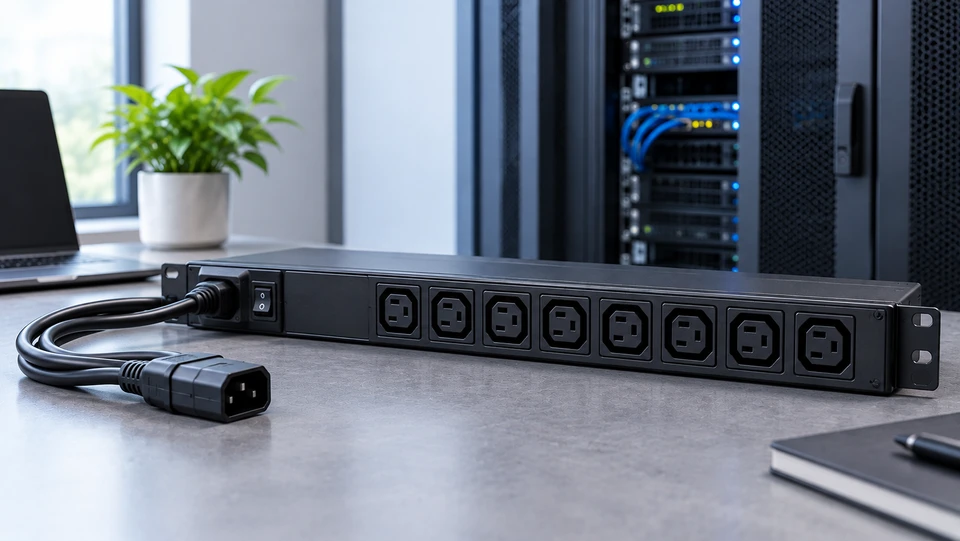
A server rack can look well organized until more equipment starts going in. A few servers, network switches or storage systems can quickly use available outlets, add cable clutter and leave less room for expansion. At that point, power distribution becomes part of rack planning rather than something to solve with an ordinary power strip.
A Power Distribution Unit (PDU) provides a structured way to distribute power across rack equipment. Depending on the model it can also offer load measurements, network monitoring, alerts or remote outlet control. For IT managers, system administrators and procurement teams understanding these options makes it easier to choose a PDU that fits the electrical and working needs of the installation.
What Is a Power Distribution Unit (PDU)?
A Power Distribution Unit (PDU) receives electrical power from an upstream source and distributes it to many connected devices through some outlets. PDUs are usually installed in server and network racks to power servers, switches, storage systems and other IT equipment.
A PDU is not simply about adding more outlets. Basic models focus on power distribution, while more advanced units can provide different levels of measurement, monitoring and control. Features vary by manufacturer and model, so buyers should review the specifications before making a purchase.
Why PDUs Are Essential for Modern IT Infrastructure
When some devices share a rack, having enough outlets is only one part of the power management challenge. IT teams also need to consider electrical load, cable routing, equipment placement and future expansion. A PDU creates a central point for distributing power and can make rack connections easier to organize.
More advanced units can provide load information, network visibility, alerts or remote outlet control. These capabilities can be useful in multi rack environments and remote locations where physical access is limited.
A PDU is one part of the wider power system. It does not replace a UPS, properly designed electrical circuits or facility level protection.
How Does a PDU Work?
A PDU receives electricity through an input connection and distributes it through several output outlets. The input must be compatible with the facility's electrical supply, including voltage, current rating, phase and plug configuration.
A basic unit may only distribute power, while an advanced model can measure loads, communicate over a network, send alerts or control individual outlets remotely.
For example, an administrator managing a remote rack may use a switched PDU to power cycle supported equipment without travelling to the site. A metered PDU can also help an IT team review current load before adding another device.
Types of Power Distribution Units
Different rack environments require different levels of power visibility and control. The main options range from straightforward distribution to more advanced management.
Basic PDU Power Distribution Unit
A basic PDU power distribution unit provides straightforward power distribution to multiple devices. It can suit smaller rack environments where equipment loads are predictable and remote monitoring is not required.
For a small server or network cabinet, a basic model may provide everything needed. Its main trade off is limited visibility compared with intelligent units.
Metered PDU Power Distribution Unit
A metered PDU adds load measurement, giving administrators better visibility into power usage. Depending on the model measurements may be available at the input, circuit or outlet level.
This can support capacity planning when an IT team is deciding whether more equipment can be added. The exact measurement points should be confirmed before buying.
Monitored PDU Power Distribution Unit
A monitored PDU adds network based visibility to rack power information. Authorized users can check supported measurements remotely instead of relying completely on physical inspections.
This can be useful across multiple racks or remote infrastructure. Some platforms may also support environmental sensors, depending on the hardware and configuration.
Switched PDU Power Distribution Unit
A switched PDU power distribution unit adds outlet level power control. Depending on the model, administrators can remotely switch individual outlets on or off.
This is useful for remote racks or equipment that occasionally needs a controlled power cycle. Scheduling and sequencing features may also be available on some platforms, but these functions are model dependent.
Managed PDU Power Distribution Unit
A managed PDU is designed for environments that need more detailed monitoring and control. Depending on the platform, it can combine power measurements, alerts, network connectivity and outlet level switching.
These features can be valuable in enterprise infrastructure with several racks. However, a managed model is not automatically the best choice; its added functionality should match the placement.
Rack Mount PDU Power Distribution Unit
A rack mount PDU is designed for standard rack installations, commonly including 19 inch rack environments. It is available in different form factors, including 1U horizontal and 0U vertical configurations.
Vertical models can provide high density outlet arrangements without using conventional horizontal rack units, while horizontal models can fit into available 1U or 2U positions. Exact outlet density, mounting hardware, input connections and electrical ratings vary by model, so the rack layout and equipment requirements should be checked before purchase.
Vertical vs Horizontal PDU: Key Differences
The main difference is how each design uses rack space. Horizontal models occupy rack units, while vertical models usually mount along the side or rear of a rack and use 0U space.
|
Feature |
Horizontal PDU |
Vertical PDU |
|
Rack space |
Typically, 1U-2U |
Commonly 0U |
|
Outlet density |
Often around 8-16, depending on model |
Often around 20-42+, depending on model |
|
Space efficiency |
Uses available rack units |
Preserves rack units for IT equipment |
|
Typical use |
Lower density rack environments |
High density rack environments |
|
Installation |
Usually, horizontal rack mounting |
Commonly side-rail, side or rear mounting, depending on rack/model |
|
Display |
Front facing display available on some models |
Display options vary by model |
A horizontal PDU can work well when some rack unit space is available. A vertical model can be more practical in a densely populated cabinet because it preserves rack units for servers and other equipment. Exact outlet counts and mounting arrangements vary by product.
How to Choose the Right PDU?
Start with the electrical requirements rather than outlet count alone. Check voltage, amperage, phase, input plug, outlet type and maximum power capacity. The PDU must match the facility's electrical supply and the equipment being connected.
Next, consider the physical rack. A 1U or 2U horizontal model uses conventional rack space, while a 0U vertical model can make better use of the cabinet's side or rear area. Installation should also allow practical access to equipment and cables.
Then decide how much management the placement needs. A basic PDU can suit predictable loads, while a metered unit adds load visibility. Monitored, switched and managed models become more useful when remote access, alerts or outlet control are required.
Finally, account for planned expansion. Selecting compatible outlets and sufficient electrical capacity from the start can reduce avoidable changes later.
PDU Technology: What's Changing in 2026?
PDU platforms are increasingly combining power distribution with network connectivity, remote monitoring, alerts and more detailed measurements. Some solutions can also fit in with broader infrastructure management systems, giving teams greater visibility across distributed environments.
Energy monitoring is especially useful as rack densities increase. More detailed load information can help teams understand consumption and plan available capacity more effectively.
AI and other high density computing workloads are also making rack level power planning more important. That does not mean every AI, edge or server placement needs a managed PDU. The appropriate choice still depends on the equipment, electrical design, rack density and required level of monitoring or control.
For related system level power planning, our PC Power Supply Buyer's Guide 2026: Top Tips and Recommendations provides extra guidance on selecting power supplies for individual PC systems.
Conclusion: Why Buy Your PDU from Server Blink?
Choosing a Power Distribution Unit is less about buying the model with the most features and more about matching it to the rack. Electrical capacity, outlet compatibility, rack space, equipment density, monitoring requirements and future expansion all matter.
Key takeaways: basic PDUs suit straightforward distribution, while metered, monitored, switched and managed models add increasing levels of visibility and control. Horizontal and vertical formats solve different rack space requirements, so the cabinet layout should be considered together with the electrical specifications.
Server Blink supports businesses with bulk orders, B2B invoicing, fast fulfilment and specialist assistance for rack infrastructure requirements. Buyers can select a PDU based on the current installation while leaving practical room for future growth.
Frequently Asked Questions
A: A basic PDU primarily distributes power, while a switched PDU can provide local or remote control of individual outlets, depending on the model.
A: A basic PDU focuses on power distribution. An intelligent PDU can add features such as metering, network monitoring, alerts and outlet level control depending on its configuration.
A: There is no single lifespan for every PDU. Service life depends on the model, components, electrical loading, working environment and maintenance. Manufacturer guidance should be used for replacement planning.
A: A switched PDU is a power distribution unit with controllable outlets. On supported models, administrators can switch selected outlets on or off locally or remotely.
A: Common issues include overloaded circuits, incompatible plugs or outlets, damaged power cords, loose connections, failed outlets and configuration problems on network allowed models. Proper sizing and routine inspection can help reduce avoidable problems.
A: Yes. Businesses can contact Server Blink for bulk PDU requirements, B2B purchasing, product availability and fulfilment options.


